Free model shop rules template.
Five clear safety rules for the model shop, covering inductions, eye protection, the laser cutter, dust extraction and locking up. Mount it by the door and change the rules to match your own equipment.
Free to use. Opens in the screen designer so you can change anything.
- Free on every plan, including the Free plan
- No watermark
- No credit card needed
What's included
- Portrait, 1080 × 1920 (vertical TV or kiosk)
- Subtle entrance animations
- Every word, colour, photo and position can be edited
- Free to use on every POMP plan, with no watermark
Make it yours
- Replace the sample words, prices and times with your own.
- Swap the photos for your own, or generate new ones with POMP AI.
- Match your brand colours and add your logo.
- Add it to a playlist alongside your other screens and schedule when it shows.
What the screen says
The model shop rules template comes with sample wording for architecture and design studios, so you only need to change the details. Out of the box it reads:
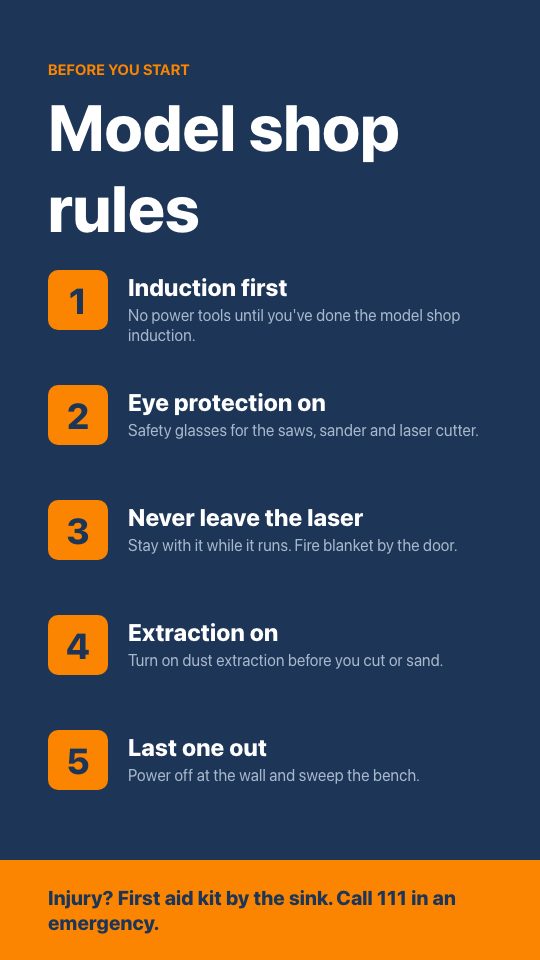
- BEFORE YOU START
- Model shop rules
- Induction first
- No power tools until you've done the model shop induction.
- Eye protection on
- Safety glasses for the saws, sander and laser cutter.
- Never leave the laser
- Stay with it while it runs. Fire blanket by the door.
- Extraction on
- Turn on dust extraction before you cut or sand.
- Last one out
- Power off at the wall and sweep the bench.
- Injury? First aid kit by the sink. Call 111 in an emergency.
Good for: safety, model shop, laser cutter, rules, workshop.
Show it on your TV
Put the model shop rules template on a TV with an Apple TV, an Android TV or Google TV box, an iPad or any web browser. Install the free POMP app, type the pairing code it shows into your dashboard, and add this design to the screen's playlist. It's a portrait design, so set the screen to portrait in the dashboard and mount the TV on its side.
Model shop rules template questions
Is the model shop rules template free?
Yes. The model shop rules template is free on every POMP plan, including the Free plan, with no watermark and no credit card needed. Create an account and it opens in the screen designer ready to edit.
Can I show the model shop rules template on an Apple TV?
Yes. Install POMP from the App Store on an Apple TV, pair it with the code it shows, and add this design to the screen's playlist. It also plays on Android TV and Google TV boxes, iPads and any web browser using the POMP web player. This template is portrait, so set the screen to portrait in the dashboard and mount the TV on its side.
What size is the model shop rules template?
It's a portrait design at 1080 × 1920 pixels, for a TV mounted on its side, a totem or a kiosk. Text is sized to read from a few metres away.
Can I change the wording, prices and photos?
Yes. Every word, price, time, colour and photo in the model shop rules template can be changed in the POMP designer. Swap in your own photos or your logo, and the screen updates as soon as you save.
What else is there for architecture and design studios?
There are 20 free templates for architecture and design studios, and more than 2320 across every sector. You can also describe a screen to POMP AI and get a design in seconds.
Use this template for free.
Create a free POMP account and the model shop rules template opens in the designer, ready for your words and photos. No watermark, no credit card.