Free moving in, step by step template.
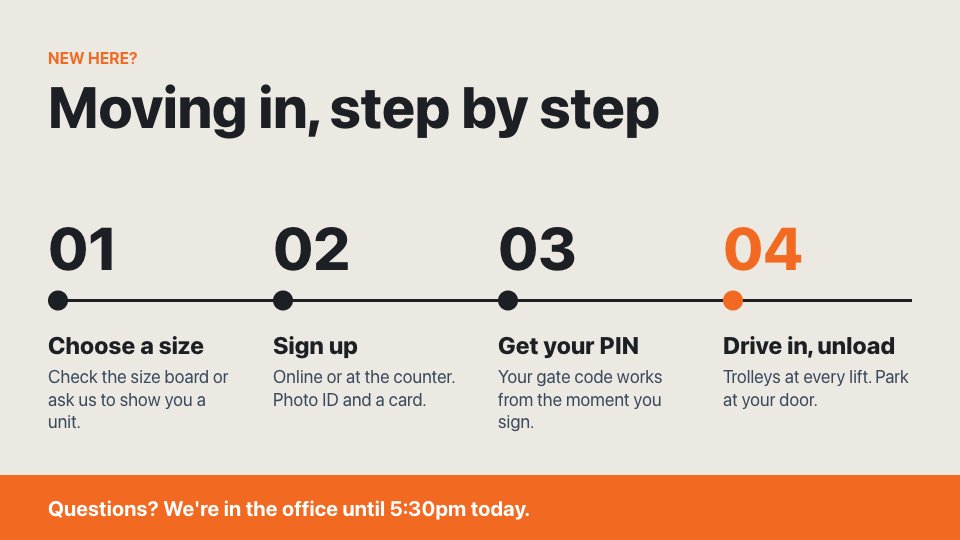
A horizontal timeline that walks new customers through moving in, from choosing a size to unloading at the door. Edit the four steps to match how your site works.
Free to use. Opens in the screen designer so you can change anything.
- Free on every plan, including the Free plan
- No watermark
- No credit card needed
What's included
- Landscape, 1920 × 1080 (Full HD)
- Subtle entrance animations
- Every word, colour, photo and position can be edited
- Free to use on every POMP plan, with no watermark
Make it yours
- Replace the sample words, prices and times with your own.
- Swap the photos for your own, or generate new ones with POMP AI.
- Match your brand colours and add your logo.
- Add it to a playlist alongside your other screens and schedule when it shows.
What the screen says
The moving in, step by step template comes with sample wording for self-storage facilities, so you only need to change the details. Out of the box it reads:
- NEW HERE?
- Moving in, step by step
- Choose a size
- Check the size board or ask us to show you a unit.
- Sign up
- Online or at the counter. Photo ID and a card.
- Get your PIN
- Your gate code works from the moment you sign.
- Drive in, unload
- Trolleys at every lift. Park at your door.
- Questions? We're in the office until 5:30pm today.
Good for: steps, timeline, move in.
Show it on your TV
Put the moving in, step by step template on a TV with an Apple TV, an Android TV or Google TV box, an iPad or any web browser. Install the free POMP app, type the pairing code it shows into your dashboard, and add this design to the screen's playlist.
Moving in, step by step template questions
Is the moving in, step by step template free?
Yes. The moving in, step by step template is free on every POMP plan, including the Free plan, with no watermark and no credit card needed. Create an account and it opens in the screen designer ready to edit.
Can I show the moving in, step by step template on an Apple TV?
Yes. Install POMP from the App Store on an Apple TV, pair it with the code it shows, and add this design to the screen's playlist. It also plays on Android TV and Google TV boxes, iPads and any web browser using the POMP web player.
What size is the moving in, step by step template?
It's a landscape design at 1920 × 1080 pixels (Full HD), which suits any normal TV. It scales up cleanly on 4K screens, and text is sized to read from across the room.
Can I change the wording, prices and photos?
Yes. Every word, price, time, colour and photo in the moving in, step by step template can be changed in the POMP designer. Swap in your own photos or your logo, and the screen updates as soon as you save.
What else is there for self-storage facilities?
There are 20 free templates for self-storage facilities, and more than 1980 across every sector. You can also describe a screen to POMP AI and get a design in seconds.
Use this template for free.
Create a free POMP account and the moving in, step by step template opens in the designer, ready for your words and photos. No watermark, no credit card.